Fly the approach to Zurich runway 14, in your browser
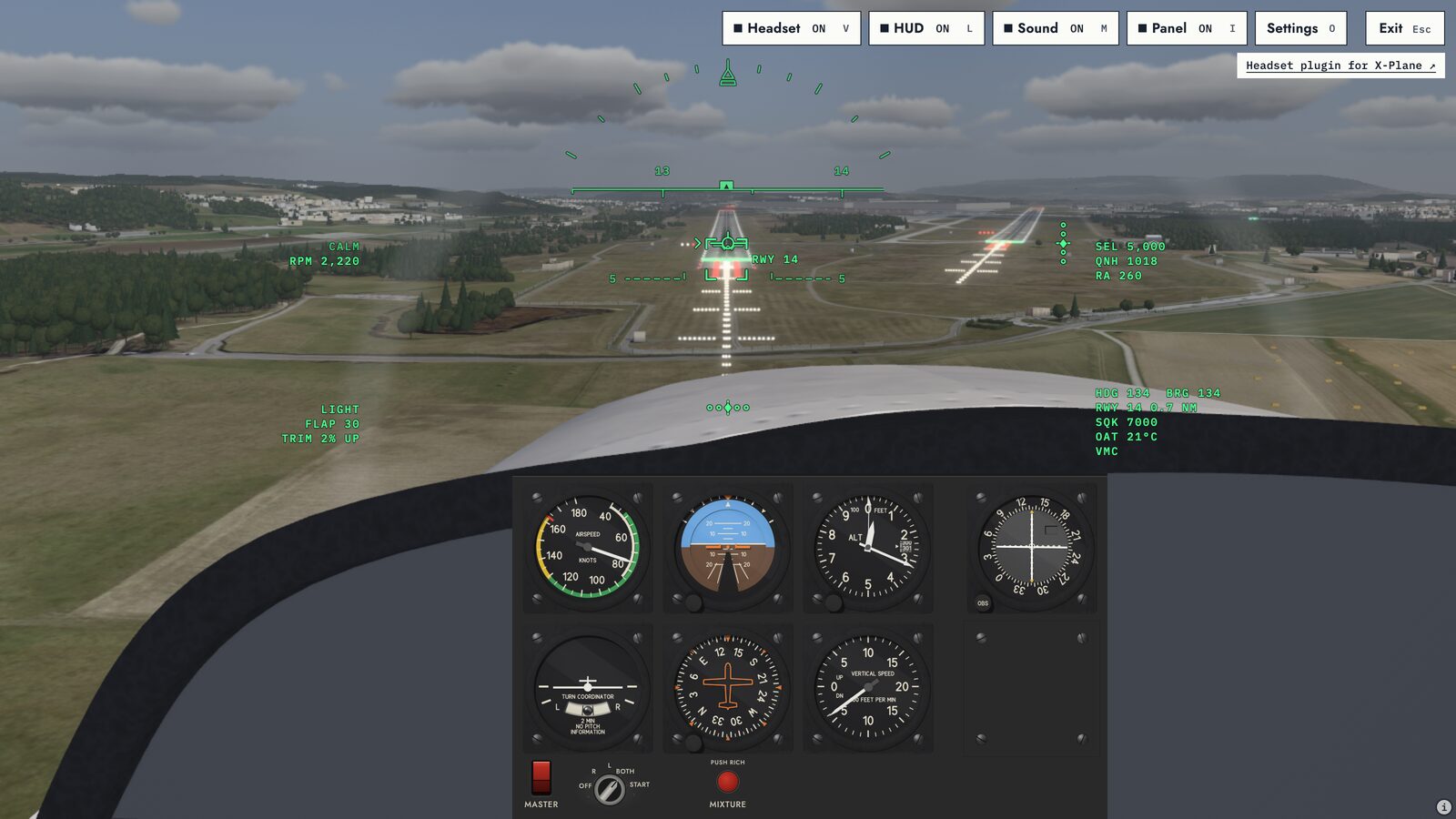
Holding Point’s flight simulator runs in your browser. It is free, needs no download and no account, and puts you 3.5 nm out on final for runway 14 at Zurich.
Land it, and the score card shows your sink rate, centreline, touchdown point and flare, then where you left the localiser and the glideslope.
Last updated
Practice only. Not for training credit.
- Length
- 3,151 m
- Width
- 60 m
- Heading
- 137° true
- Threshold
- 1,402 ft
- Glideslope
- 3°
- Start
- 3.5 nm final
Q01Can I fly an ILS approach in my browser?
Yes, in part. You fly the last 3.5 nm to runway 14 at Zurich on a 3° path, and the sim scores you against the ILS localiser and the 3° glideslope.
The light aircraft has no ILS needles yet. For now you fly it visually, on the runway and the PAPI lights.
- The score runs from a stabilised gate at 1,000 ft above the runway down to a 200 ft CAT I decision height.
- At the gate you need landing flap set, both beams within one dot, speed between Vref and Vref plus 20 kt, and a sink rate under 1,000 fpm.
- The flight starts on final, not at the initial approach fix. There is no missed approach yet.
Sources
- Flight Safety Foundation, ALAR Briefing Note 7.1, stabilised approach
- ICAO Annex 6 Part I, CAT I decision height
- OpenStreetMap, runway 14 threshold and far end
Q02Is it free?
Yes. There is no download, no account and no payment. Open this page and press Fly now.
- The site counts visits with cookie-free analytics that respect Do Not Track. Fly mode sends no flight or score data anywhere.
Q03Does it work with my joystick, yoke or HOTAS?
Yes, in Chrome, Edge or Firefox. Plug the controller in and press a button; the sim reads it through the browser’s Gamepad API.
Sticks, yokes, throttles and pedals the sim knows map themselves. Anything else you bind by hand in the controller set-up.
- Ready-made settings: T.Flight HOTAS, X56 stick and throttle, Honeycomb Alpha and Bravo, Saitek Pro Flight pedals and Thrustmaster pedals.
- Each axis (pitch, roll, yaw and throttle) can be inverted and given a deadzone of up to 25%. Buttons cover flap, trim, brake, the panel and exit.
- A standard game pad works with no set-up.
- Safari reads game pads only. For a joystick or yoke, use Chrome, Edge or Firefox.
- No controller? The keyboard flies it: the arrow keys to pitch and bank, T and G for power, Z and X for rudder, Space to brake. Q, E, R and F look around and W looks ahead; the camera keys match X‑Plane. Press H in flight for every key.
Q04How realistic is the flight model?
The light aircraft is a physics model built from published data: the type’s published owner’s handbook, NASA and NACA reports, and the open JSBSim model. It models the stall, propeller torque and P-factor, ground effect, and weight and balance.
- By default it flies in live weather: the reported wind and gusts, plus cloud from the nearest readable report. Spins still turn too fast and too flat; that is on the list below.
Sources
- The type’s published owner’s handbook, figures 5-3 and 5-7 (performance)
- NASA SP-468 (Loftin), Quest for Performance, chapter 6, p. 145 (light-trainer drag polar)
- NASA CR-1975, appendix G (stability derivatives of a larger single, standing in for the trainer)
- NACA Report 824 (NACA 2412 and 0009 sections)
- Viterna and Corrigan, in NASA CP-2230 (past the stall)
- NACA TM-77, Wieselsberger (ground effect)
- Ribner, NACA TR-820, Propellers in Yaw
- JSBSim open light-aircraft model (propeller and yaw data)
Q05What aircraft can I fly?
Two: a four-seat light trainer built from published data, and a jet. Press 1 or 2 in flight to switch.
Only the light aircraft’s approach is scored today. Switching type needs a keyboard for now.
Q06How is the approach scored?
The landing scores out of 100: sink rate 40 points, centreline 25, touchdown point 20 and flare 15.
The debrief then shows whether you were stable at 1,000 ft, whether you were within one dot at the 200 ft decision height, and your worst localiser and glideslope deviation.
- The touchdown zone runs from 300 to 500 m past the threshold.
- Touch down harder than 600 fpm, or with more than 10° of bank, and it counts as a crash.
- The debrief says what went wrong first, in plain words, for example “Drifted left of the localiser at 600 ft.”

Sources
- Flight Safety Foundation, ALAR Briefing Note 7.1, stabilised approach
- ICAO Annex 6 Part I, CAT I decision height
Q07Will this count towards a licence?
No. It is not an approved training device, so no authority counts it towards a licence or rating.
For familiarisation and fun only. This flight simulator is not an approved training device and gives no training credit with the CAA, EASA, the FAA or any other authority. Never use it for real-world navigation. Learn to fly with an approved training organisation and a qualified instructor.
Every score card says: Practice only. Not for training credit.
Q08Does it work on a phone?
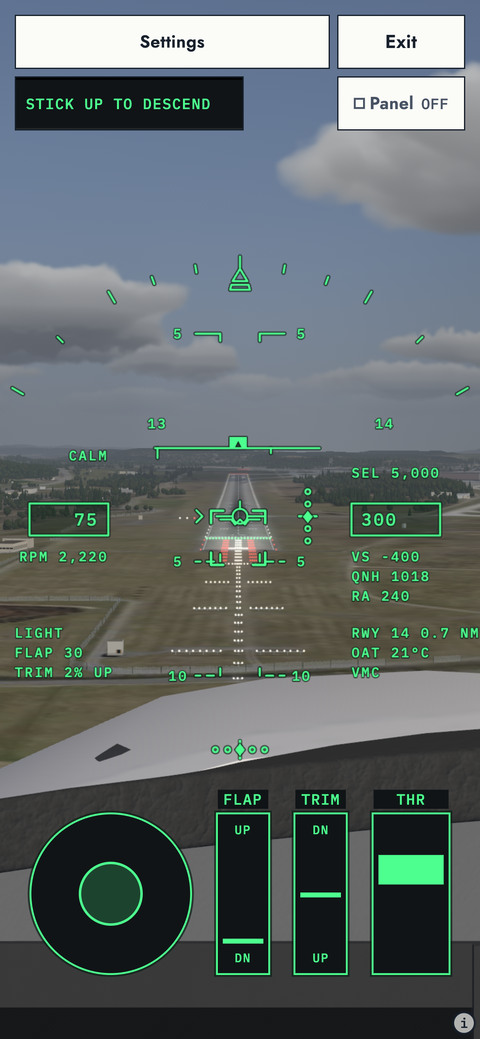
Yes. On a touch screen you fly with an on-screen stick, a throttle lever, flap and trim levers and a brake button.
The instrument panel stays off on phone screens, so a laptop or desktop gives the fuller view.
Q09Does it run on a Chromebook, or do I need a gaming PC?
You do not need a gaming PC. It runs in an up-to-date browser with WebGL2.
Chrome on a Chromebook supports WebGL2, so it should run; we have not tested one yet. Without WebGL2 you can still fly, but in open sky with no runway.
Q10What are the ILS 14 frequency and minima at Zurich?
On the VATSIM Switzerland sim chart for ILS runway 14, the ILS is IKL on 111.75, course 134°, with a 3.00° glide path. The CAT I decision altitude is 1,602 ft, 200 ft above the 1,402 ft threshold.
These are sim chart figures, not for real-world navigation. The sim does not tune a frequency yet; its beam follows the same 3° path to the same threshold height.
| Ident | IKL |
|---|---|
| Frequency | 111.75 |
| Course | 134° |
| Glide path | 3.00° |
| Final approach point | OSNEM, D8.2 IKL, 4,000 ft |
| Threshold elevation | 1,402 ft |
| CAT I decision altitude | 1,602 ft (200 ft) |
SnagsWhat it does not do yet
- Localiser and glideslope needles in the light aircraft.
- The full procedure from the initial approach fix, and the missed approach.
- A score for the jet’s approach.
- Spins that turn at the right rate. Today they turn too fast and too flat.
- Radio calls.
- Real Zurich scenery. The runway sits where the real one lies; the ground around it is generic for now.
CabinHear it through a headset
The engine plays through a passive headset sound by default. Press C in flight to hear it bare. The same headset sound for X‑Plane 12 is HeadphonesXP, our headset plugin.
Runway data © OpenStreetMap contributors.